
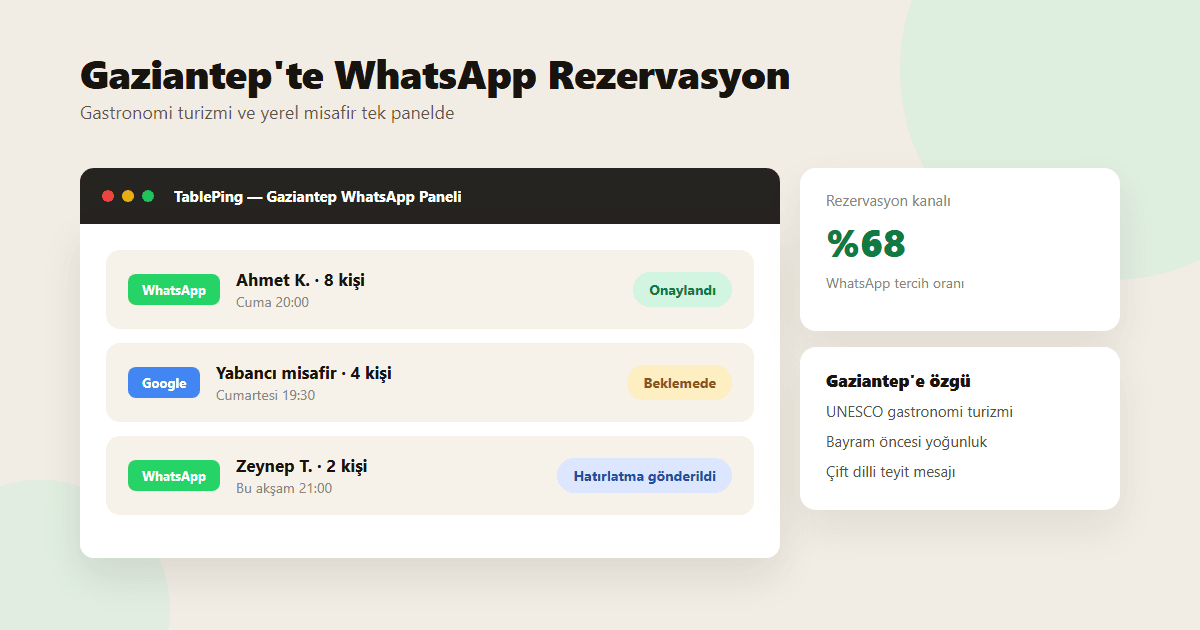
Managing Restaurant Reservations via WhatsApp in Gaziantep
In a UNESCO gastronomy city, two guest profiles book at once: out-of-town visitors who find you on Google, and locals who message on WhatsApp. Here's how to run both from one panel.
Gaziantep's status as a UNESCO Creative City of Gastronomy brings restaurants two distinct guest types. Out-of-town visitors usually plan ahead, find you through a Google search or a hotel referral, and book by web form or phone call. Local guests, by contrast, mostly book by sending a quick WhatsApp message and expect a fast reply. When these two channels live in separate notebooks or phones, double-booking the same table at the same time is only a matter of time.
This guide covers how Gaziantep restaurants professionalize WhatsApp booking and bring the tourist-plus-local mix into one panel.
1. Two guest profiles in Gaziantep: tourists and locals
Gastronomy tourists tend to plan ahead, find you on Google, and want a fixed time — sometimes in a different language. Local guests act closer to last-minute, sending a short WhatsApp message and expecting a quick answer.
When the same team tries to track both profiles in one notebook or one phone, knowing which table is actually free becomes guesswork.
- Tourists: Google/hotel referral, planned ahead, fixed time
- Locals: WhatsApp, last-minute, fast-reply expectation
- Both need one shared, live view of occupancy
2. Setting up the WhatsApp booking flow
In TablePing, an incoming WhatsApp message becomes a reservation request; host staff confirm party size, date, and time from the panel. Confirmation triggers an automatic reply — no separate notebook or spreadsheet needed.
Predefined message templates ("Your reservation is confirmed", "Your table is being prepared") save host staff from rewriting the same reply every time.
- Incoming WhatsApp message → reservation record in the panel
- Standard confirmation and reminder templates
- All reservations in one list on the host screen
3. Deposits for holiday and special-occasion demand
Ahead of religious holidays and special occasions, large family tables book up fast; one cancellation is a real loss. Make deposits standard for parties of 6+ during these periods.
Send the deposit link automatically with confirmation; don’t lock a large table until payment lands, and state cancellation terms upfront.
- Deposits for parties of 6+
- Clear cancellation terms ahead of holidays
- No table block without payment confirmation
4. Bilingual confirmations to avoid losing tourist guests
Language gaps can break communication with out-of-town guests. Ready-made Turkish/English confirmation and reminder templates help tourist guests understand their booking correctly and cut last-minute confusion.
5. Unify every channel in one panel
Requests spread across WhatsApp, phone, Google, and a web form make double-booking inevitable. TablePing brings every channel into one screen — host staff focus on the door, kitchen and floor see the same live occupancy.
For Gaziantep’s tourist-plus-local mix, the cleanest answer is connecting every channel to one occupancy table.
In Gaziantep, gastronomy tourism and local demand arrive at once, through different channels. Standardizing the WhatsApp flow, requiring deposits, and unifying every channel in one panel makes it possible to run a holiday rush and an ordinary Tuesday night with the same discipline.
Try WhatsApp reservation management with a free TablePing trial.